An AI chatbot for websites, trained on your own content.
Chatdrill is an AI chatbot for websites that learns from your help centre, product pages and PDFs instead of the open internet. It answers customer questions in seconds, shows the source behind every reply, and hands the conversation to a person the moment it should.
- Trained on your own content
- Sources on every answer
- Human handoff built in
4 sources
Website crawl, help centre, uploaded documents and hand-written FAQ pairs
24/7
Automated customer service on nights, weekends and public holidays
1 click
Hands the conversation to a person with the full context attached
Any language
Detects the visitor's language and replies in it, whatever your docs use
An AI customer support agent for the questions your team answers every day.
Where is my order, how do I reset my password, do you ship to Ireland, what is your returns window, how do I change my plan. Individually trivial, collectively most of your queue.
An AI chatbot for websites is only worth switching on if it is right. That depends far less on the model than on what it is allowed to read: a grounded agent working from your own help centre, product pages and policy PDFs will beat a general assistant guessing at your refund window every single time.
So the Chatdrill agent retrieves the passages that actually relate to the question, answers from them, and names the source. When your content does not cover something, that is the answer it gives — and a missing answer becomes a content task, not a quietly wrong reply sitting in a transcript nobody reads.
It runs on every channel the shared team inbox covers, not just the website widget, and the answers it drafts are available to your agents even in conversations it is not handling itself.
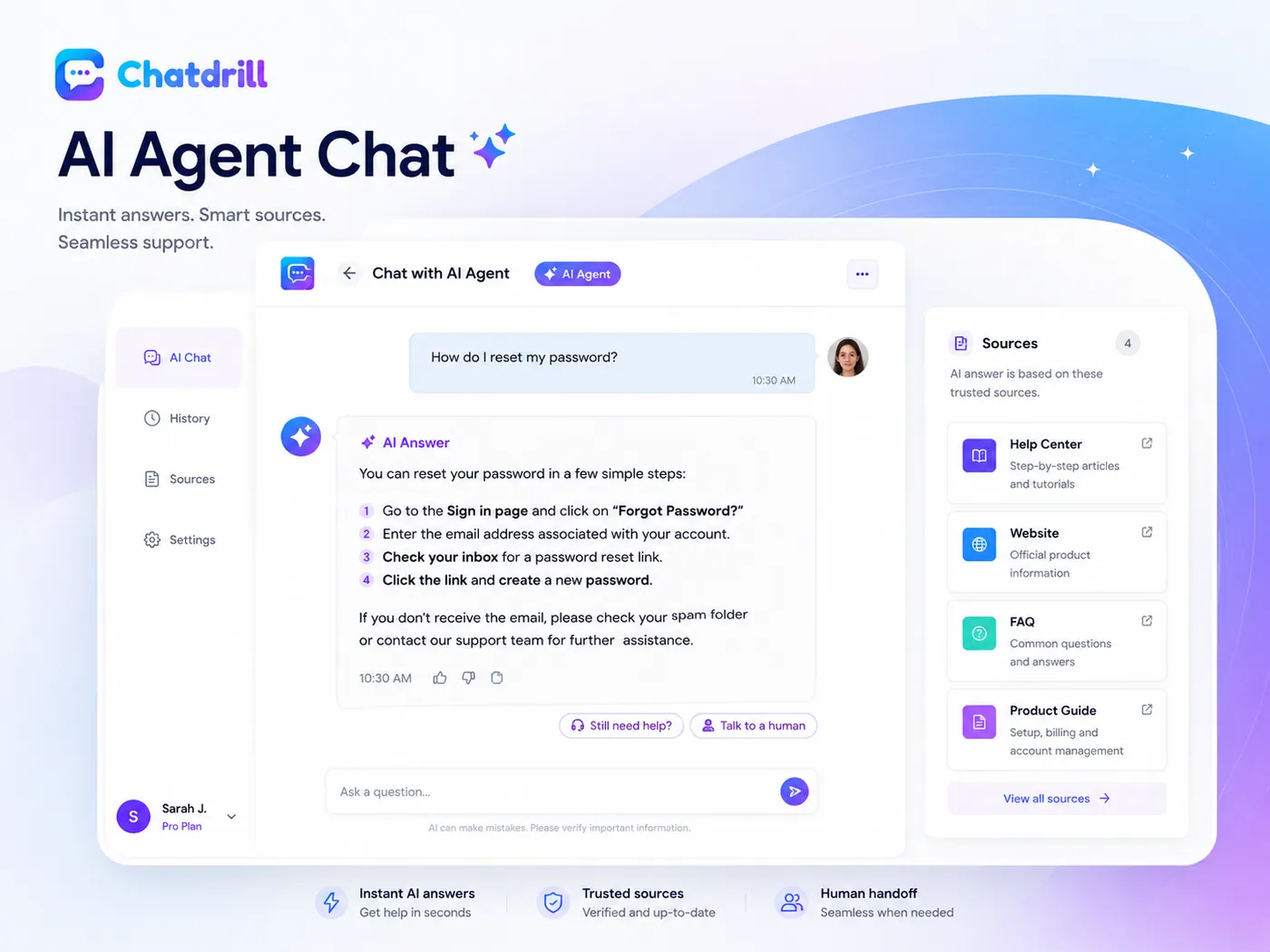
How to train your AI support agent on your own content.
There is no model to fine-tune and no prompt engineering to do. You choose the training data, describe how the agent should behave, and then read the answers it produces.
Point it at your website
The crawler reads your public pages, keeps their structure and skips navigation noise. You choose which paths are included and which are excluded, so drafts and internal pages never become training data.
Upload documents and FAQs
Add PDFs, policy documents and price lists, connect your knowledge base, or write question-and-answer pairs for the things that currently only live in someone's head.
Set tone and boundaries
Describe the voice in plain English, give the agent a name, and list what it must never do — invent a delivery date, offer a discount, or guess at a policy it cannot find.
Publish, then read the answers
Turn it on for one page or the whole site. Every answer is logged with its sources and its confidence score, so a wrong answer points you straight at the content behind it.
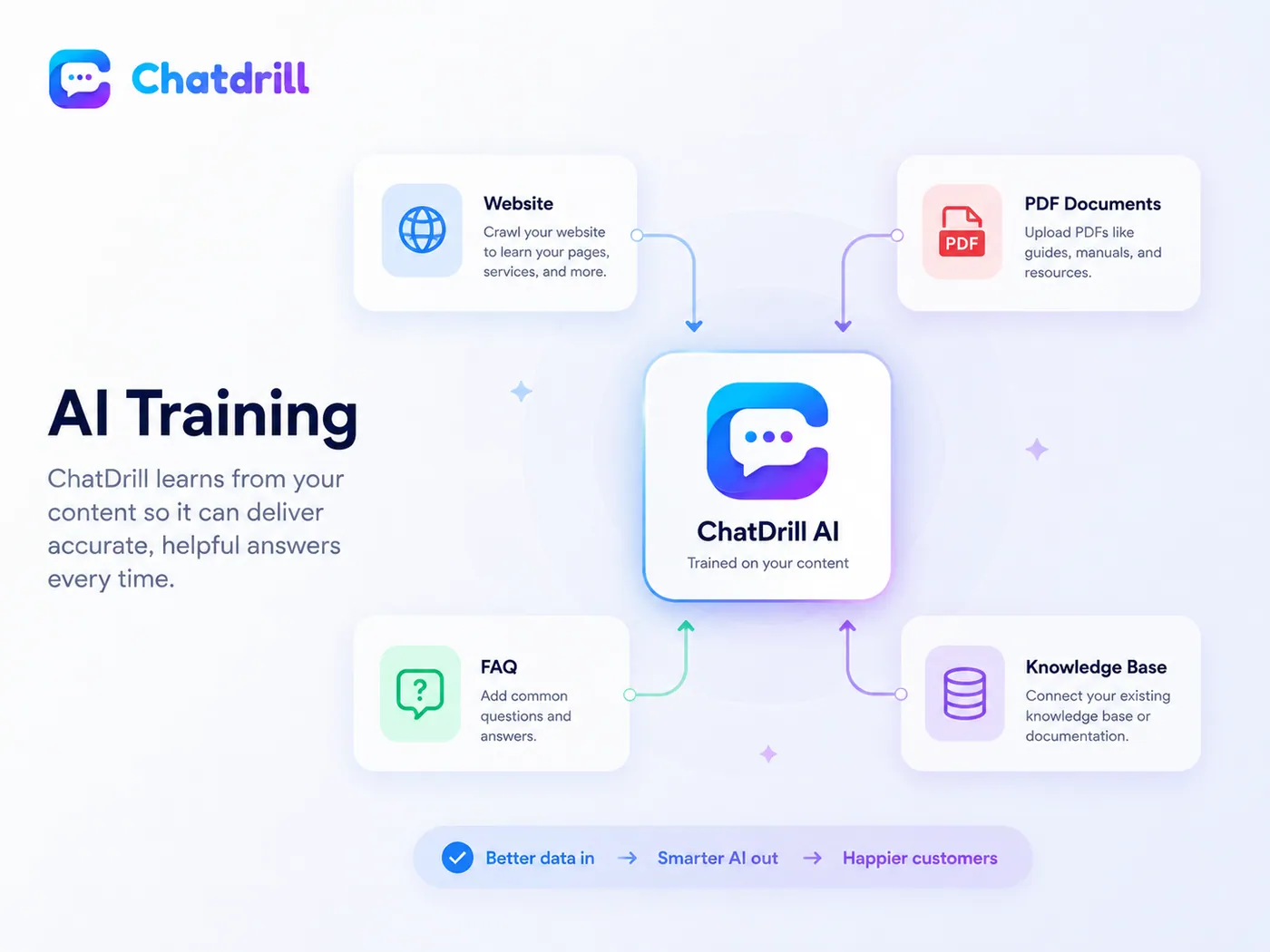
Website crawl
chatdrill.com · 184 pages
Help centre
62 published articles
Documents
Returns.pdf · Shipping.pdf · Pricing 2026.pdf
FAQ pairs
48 written by your team
Product manual v4.pdf
Uploaded 2 minutes ago
Every training source is listed, dated and switched off in one click.
Knowledge is not a black box. You can see what the agent has read, when it last re-read it, and revoke any source the moment it goes out of date.
- Include and exclude paths so drafts, staging pages and internal docs never become training data.
- Scheduled re-crawls, plus a forced re-sync the moment you publish a pricing or policy change.
- Separate knowledge per website when you run more than one brand from a single workspace.
- One article, two jobs — the same help centre content answers customers who self-serve and trains the agent that answers the rest.
Grounded answers with cited sources, not confident guesses.
The agent retrieves the passages that genuinely relate to the question and answers from them. If nothing relevant exists in your content, that is the answer the customer gets.
- A source on every reply — the document or page it came from, visible to your team and optionally to the customer.
- Confidence scoring with a threshold you control, and a different threshold per topic where the cost of being wrong is higher.
- Custom fallback messages for the questions the agent should not attempt at all — refunds, legal wording, medical advice.
- A gap report ranking the questions your content cannot answer yet, so hallucination is fixed at the source.
AI replies that make your own agents faster at their job.
Not every conversation should be automated. For the rest, the agent drafts the reply, summarises the thread and labels the intent — a human still decides what actually gets sent.
- Suggested replies written from your knowledge base, with the source attached so the agent can check it in a second.
- Rewrite in one click — shorter, warmer, more formal, or translated into the customer's language.
- Thread summaries so a transfer or an escalation doesn't mean reading forty messages first.
- Intent labels that feed routing, tagging and your reports without anyone tagging by hand.
"I was charged twice for the same order this morning. Can you sort it out today?"
I can see two authorisations on order #10428 — one of them is a pending hold, not a charge, and it drops off within three working days. If it is still there on Thursday, reply here and I will refund it immediately.
Conversation summary
- Customer sees two charges for order #10428 placed this morning.
- AI confirmed one is a pending authorisation, not a settled charge.
- Customer wants written confirmation before Thursday.
 Your brand
24/7 customer support on nights, weekends and the hours you can't staff.
Most customer questions arrive when nobody is at a desk. The agent answers them, collects what a human will need in the morning, and tells the customer exactly what happens next.
Every timezone, every language
It detects the visitor's language and replies in it, even when your documents are written in another one.
Working hours aware
It never promises a reply "in a minute" at 3am. It gives the real time your team opens, in the customer's timezone.
A queue, not a black hole
Anything it can't finish is summarised, tagged and waiting in the inbox when the first agent logs in.
AI to human handoff that carries the whole conversation with it.
The handoff is the part most AI support gets wrong. In Chatdrill it triggers three ways — confidence below your threshold, a keyword you flagged, or the customer simply asking — and the transcript, summary and customer record travel with it, so nobody repeats themselves.
 Sarah — Support team
What this AI will never do.
An AI agent is only useful if you can trust what it says to your customers when you are not watching. These are the limits we build in on purpose, not settings you have to remember to switch on.
It won't invent a policy
If your content doesn't cover the question, the agent says so. It does not fill the gap with something that sounds reasonable — which is exactly how hallucinated answers reach customers.
It won't pretend to be human
The AI is labelled as AI in the widget and in the transcript. Customers can ask for a person at any point in the conversation.
It won't trap anyone in a loop
Two failed attempts at the same question and the conversation goes to a human — or to a form, if your team is offline.
It won't ignore your rules
Refunds, discounts, medical or legal wording, competitor comparisons — anything you put out of bounds stays out of bounds.
It won't guess when unsure
Every answer is scored for confidence. Below the threshold you set, the agent escalates instead of sending a confident-sounding maybe.
It won't leak across workspaces
Your knowledge is scoped to your workspace and used to answer your customers. It is not shared with anyone else's agent.
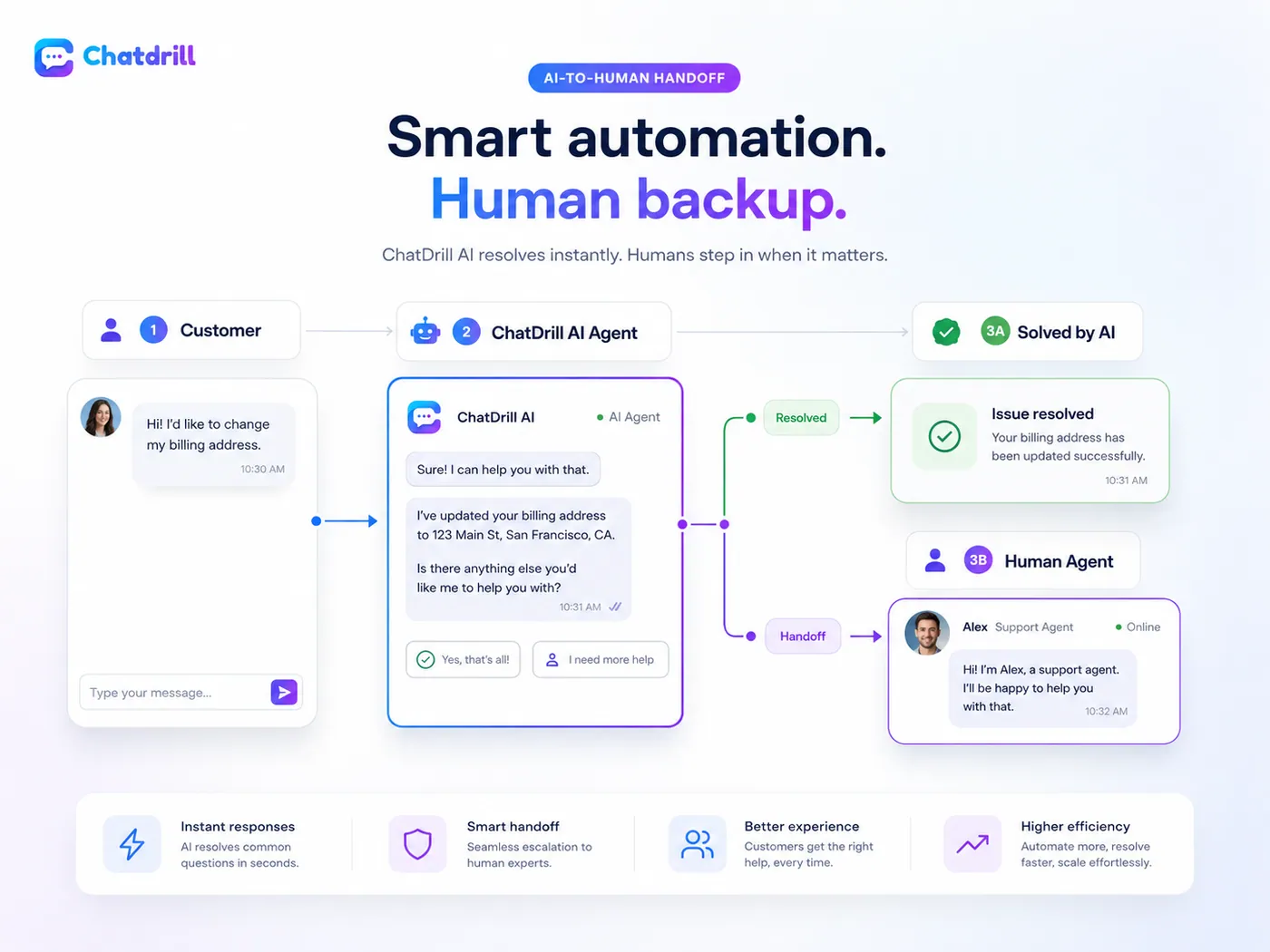
We would rather the agent say "I don't know, let me get someone" than damage a customer relationship with a well-worded invention.
Measure AI resolution rate, handoffs and the answers you can't give yet.
Deflection is easy to claim and easy to fake. These are the numbers that tell you whether customers were helped or simply filtered out of your queue.
Resolution, not just deflection
Conversations closed without a human, reported separately from the ones that came back an hour later.
Handoff reasons
Low confidence, customer asked, rule matched — so you fix the cause instead of the symptom.
Unanswered questions
A ranked list of what customers asked that your knowledge base does not cover yet.
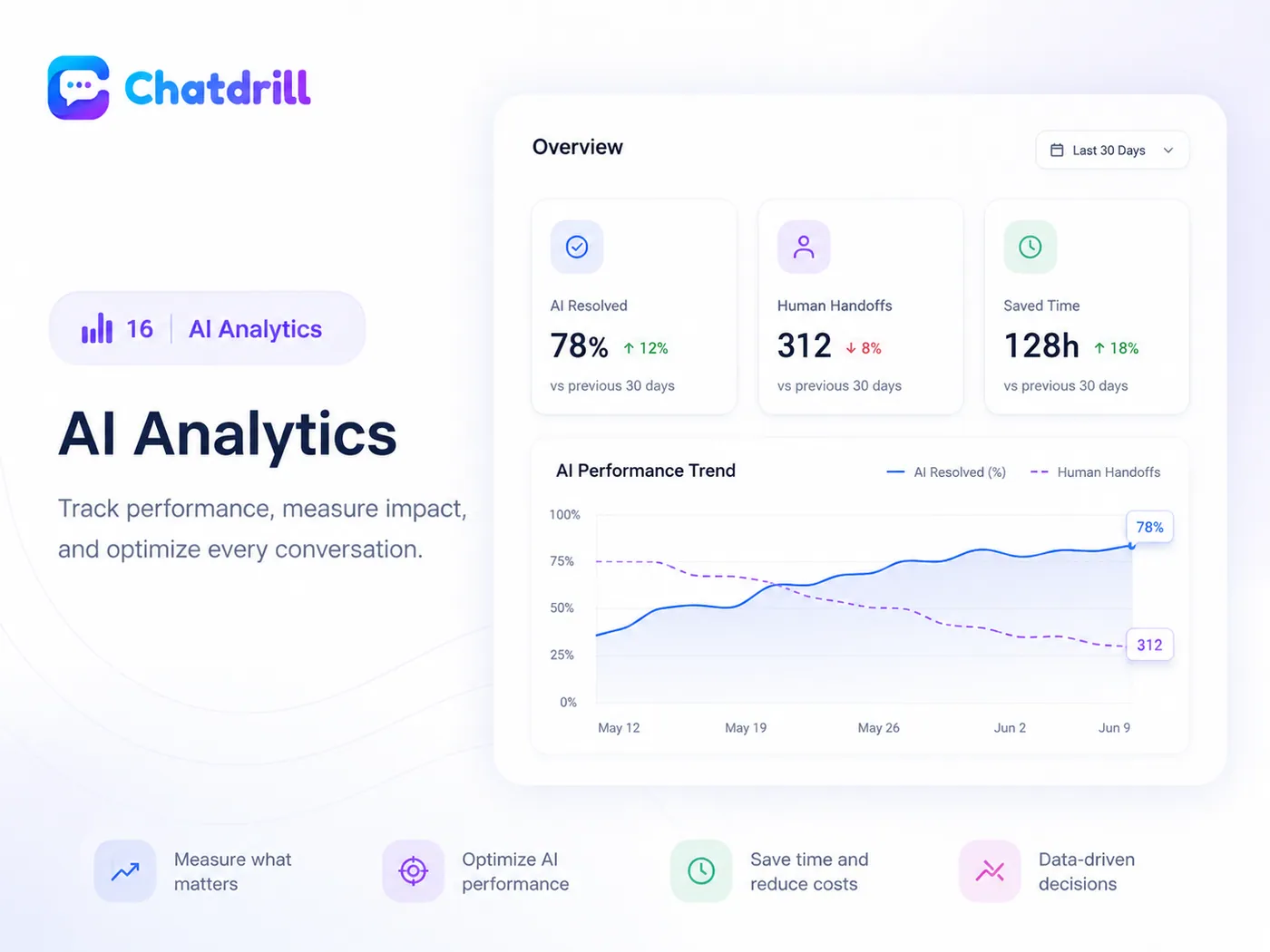
AI numbers sit inside your wider customer support analytics.
First response time, resolution time, CSAT and channel mix belong in the same dashboard as AI resolution rate — otherwise you can only prove the AI is busy, not that it is helping.
Everything the AI agent brings with it.
Knowledge, controls, escalation and reporting — configured from the dashboard, not from a support ticket or a professional services engagement.
Website crawler
Point it at a domain and it indexes the public pages, then re-crawls on the schedule you set.
Document upload
PDFs, docs and spreadsheets become answerable knowledge, with the file named as the source.
FAQ pairs
Write exact questions and exact answers for the cases you never want paraphrased.
AI instructions
Plain-English rules: what to do, what to refuse, when to escalate, what to always mention.
Brand tone
Formal, warm or brief — plus a persona name so the agent sounds like it belongs to you.
Suggested replies
When a human is answering, the agent drafts the reply and cites where it came from.
Conversation summaries
A short summary on every long thread, so the next person doesn't read forty messages.
Intent detection
Classify what the customer actually wants, then route, tag and report on it.
Human handoff
Confidence, keyword or customer request — three ways out, all of them one step.
Feed the agent from your own systems.
Bring your own data and control the answer surface programmatically.
AI chatbot questions teams ask before switching it on.
Accuracy, control, escalation and data — the four things that decide whether an AI agent is safe to put in front of your customers.
Yes — that is exactly what the Chatdrill AI agent does. It crawls your public pages, help centre articles and uploaded documents, then answers customer questions from that content and cites the page or file it used. Anything your website does not cover, it does not attempt.
You give it sources rather than training a model. Point the crawler at your domain, upload PDFs and policy documents, connect your knowledge base and write FAQ pairs for the answers that only exist in someone's head. Set the tone and the boundaries in plain English, publish, and the agent is answering within minutes.
By grounding every answer in retrieved passages from your own content and refusing to answer when nothing relevant is found. Each reply carries the source it came from and a confidence score, and answers below the threshold you set are handed to a human instead of sent. You also get a gap report listing the questions your content cannot answer yet.
At any point, from either side. The agent escalates automatically when confidence drops, when a keyword you flagged appears, or when the customer asks for a person — and your team can jump into any AI conversation mid-thread. The transcript, the summary and the customer record go with it, so nobody repeats themselves.
It says so, and then it does something useful. Inside working hours it hands over to an available agent with a summary attached; outside them it captures an email address, states when a person will reply, and queues the conversation in your team inbox already tagged. A dead end is never one of the options.
No. Your content and conversations are scoped to your workspace and used to answer your customers. Knowledge is not pooled between workspaces, and you can delete a source or the whole knowledge base at any time — the agent stops using it immediately.
It detects the visitor's language and replies in it, including when your source documents are written in a different language. That means a help centre in English can answer a question typed in Spanish or Nepali without you maintaining three versions of every article.
Most teams are testing answers the same day. The crawl of a normal marketing site and help centre finishes in minutes, and uploading documents is a drag and drop. The part worth taking slowly is reading the first few hundred answers and fixing the content behind the ones you disagree with.
An AI support agent answers a customer in its own words from your documentation, rather than following a fixed script. A scripted chatbot can only match a question someone anticipated in advance; an AI agent reads the sources you point it at, composes an answer, cites where it came from, and hands over to a person when it should not be the one replying.
No — an article is private unless you publish it. Articles exist so the AI can answer from them, and much of what a team writes for that purpose is useful as grounding but not meant to be read word for word by anyone who opens the widget. Publishing is a separate, deliberate action, taken per article.
Point it at your content. Read what it can answer.
Train the AI agent on your website today and check the answers before anyone else sees them.
Free plan available. No credit card required.