Live chat software that turns website visitors into conversations.
Chatdrill is live chat software you can install in one line and run from the same inbox as every other channel. Talk to visitors in real time while they are still deciding, send proactive chat messages based on what they are actually doing, and let AI cover the hours nobody is at a desk.
- One line of script
- Works on any website
- Free live chat plan
 Your brand
1 line
Of JavaScript — or a one-click plugin — installs the live chat widget
6 platforms
Shopify, WordPress, Webflow, Wix, Squarespace and WooCommerce
24/7
AI answers and offline forms cover the hours your team cannot
3 steps
Paste, customise, start answering — most teams are live the same day
Website live chat answers the question while the visitor is still on the page.
A contact form is a promise to reply later. Real-time customer chat is the answer now — and the difference between the two is usually the difference between a sale and a closed tab.
Most of the questions that stop a purchase are small: does this ship to my country, is medium true to size, can I add seats mid-month, what happens to my data. They are not worth an email, and nobody phones about them. They are exactly the questions a live chat widget is built for, because the person asking is already on the page with their card half out.
Chatdrill keeps the answer, the customer's history and their live journey in the same screen as the reply box, so your agents are not searching three tools while somebody waits. Canned replies cover the answers you give every day, typing previews let you start looking things up before the message even lands, and transfers carry the transcript with them.
Every chat is one conversation, in one thread — not a ticket that starts from zero.
The same conversation continues across sessions and devices, and the same customer record follows it into WhatsApp, Instagram, Messenger or email through the shared inbox software your whole team answers from. When chat volume outgrows the hours you can staff, the AI chatbot trained on your own content answers first and escalates what it should not attempt.
Nothing here needs a rollout project. Install the widget, answer the first week of chats yourself, and automate the repetition once you can see what it actually is.
How to add live chat to your website in three steps.
No implementation project, no onboarding call you have to sit through. Paste, customise, answer — in that order.
Paste one line of JavaScript
Drop the Chatdrill snippet before the closing body tag, or install the Shopify, WordPress, Webflow or Wix plugin. Nothing else on your site changes, and the chat widget appears on every page the snippet loads on.
Customise the chat widget
Set colour, position, avatar, greeting, pre-chat form fields, working hours and languages in the dashboard. Saving publishes the change — there is no redeploy and no developer in the loop.
Invite your team and start answering
Add agents, set working hours, and reply from the web app or the iOS and Android apps. Every message is saved to that customer's profile, so the next conversation starts with the last one attached.
Nothing breaks while you experiment
The chat widget can be switched off, limited to specific pages, hidden on mobile, or shown to a percentage of visitors while you decide how you want it to behave. Rolling it back is a toggle, not a deploy.
Real-time customer chat with the context already open beside the reply box.
Chat only feels fast if the agent has what they need. Chatdrill puts the answer, the history and the customer's details in the same screen as the message they are replying to.
- Typing previews — read the question while it is still being written and cut your response time before the message arrives.
- Canned replies expand from a slash shortcut with variables already filled in, then you edit the details that are specific to this customer.
- Files, images and emoji both ways, straight in the thread — size guides, invoices, screenshots of the error.
- Transfer without losing the thread — the next agent gets the transcript, the internal notes and the customer's order history.
Your brand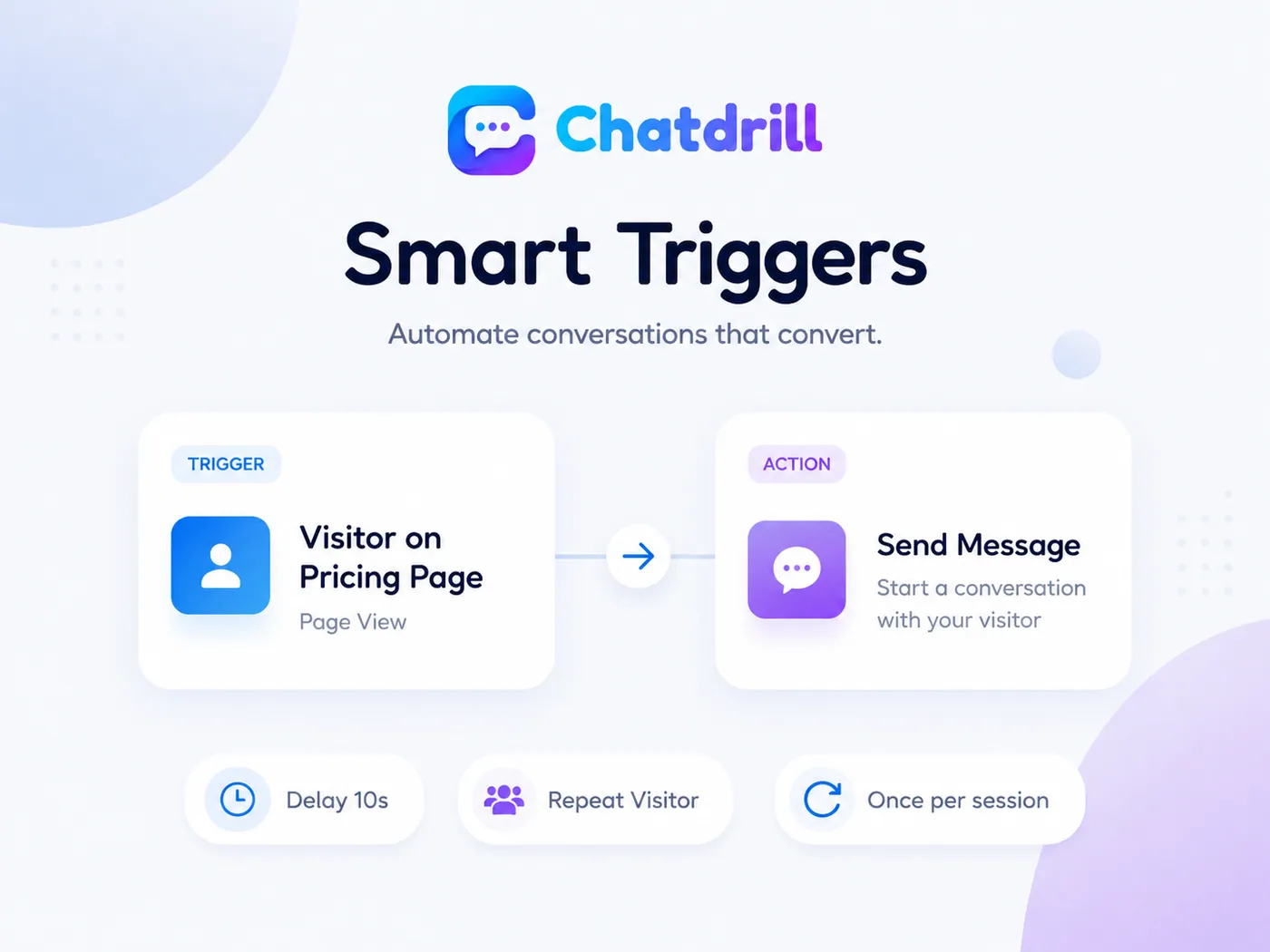
Proactive chat triggers that start the conversation first.
A greeting that fires on every page of every visit is an annoyance. A greeting that fires on the third visit to your pricing page, after twenty-five seconds of reading, is a well-timed offer of help.
Trigger on real signals
Page or path, time on page, scroll depth, exit intent, referrer, campaign, return visit or cart value — combined however you need them.
Write the message per page
Different wording on pricing, checkout, docs and the blog, in the visitor's own language, with a fallback for everything else.
Measured, not guessed
Every proactive chat message reports opens, replies and conversations started, so you can retire the ones that only generate dismissals.
Proactive messages that ask once, then stay quiet.
The reason people hate chat widgets is not chat. It is the third pop-up in ninety seconds. Chatdrill caps how often a rule may speak and stops the moment a real conversation starts.
- Frequency caps — once per session, once per visitor, or never again after someone dismisses the greeting.
- Stop on reply so automation never talks over a live agent or interrupts a conversation already in progress.
- Quiet zones — exclude checkout, mobile screens, logged-in customers or any path you list.
- Test on yourself first — run the flow against your own session before a single visitor sees it.
Working hours, offline forms and the 24/7 cover in between.
Half of the questions on most websites arrive when the office is shut. The widget should behave differently at 3am than it does at 3pm — and say so honestly rather than promising a reply in a minute.
Set real working hours
Per team and per timezone, with holidays. The widget shows the actual next opening time instead of an optimistic "replies in a minute".
Offline form, not a dead end
Outside hours the widget collects the question and an email address, creates a conversation in the inbox, and emails your reply when you send it.
Or let AI keep answering
The AI agent answers from your help centre and documents overnight, then queues anything it could not finish, already summarised and tagged.
Answer from your phone
Push notifications on iOS and Android mean an urgent chat at the weekend does not have to wait for someone to open a laptop.
Know who you are talking to before you press send.
Beside every conversation sits the person: where they are, what they read, how many times they have been back, and what they bought last time.
- Live journey — the pages they visited in this session and how long they stayed on each one.
- Source, campaign and device, so you know whether they arrived from an ad, a search result or your documentation.
- Past conversations and orders attached to one profile, whichever channel they used last time.
- Start the chat yourself when a visitor stalls on checkout — no trigger required.
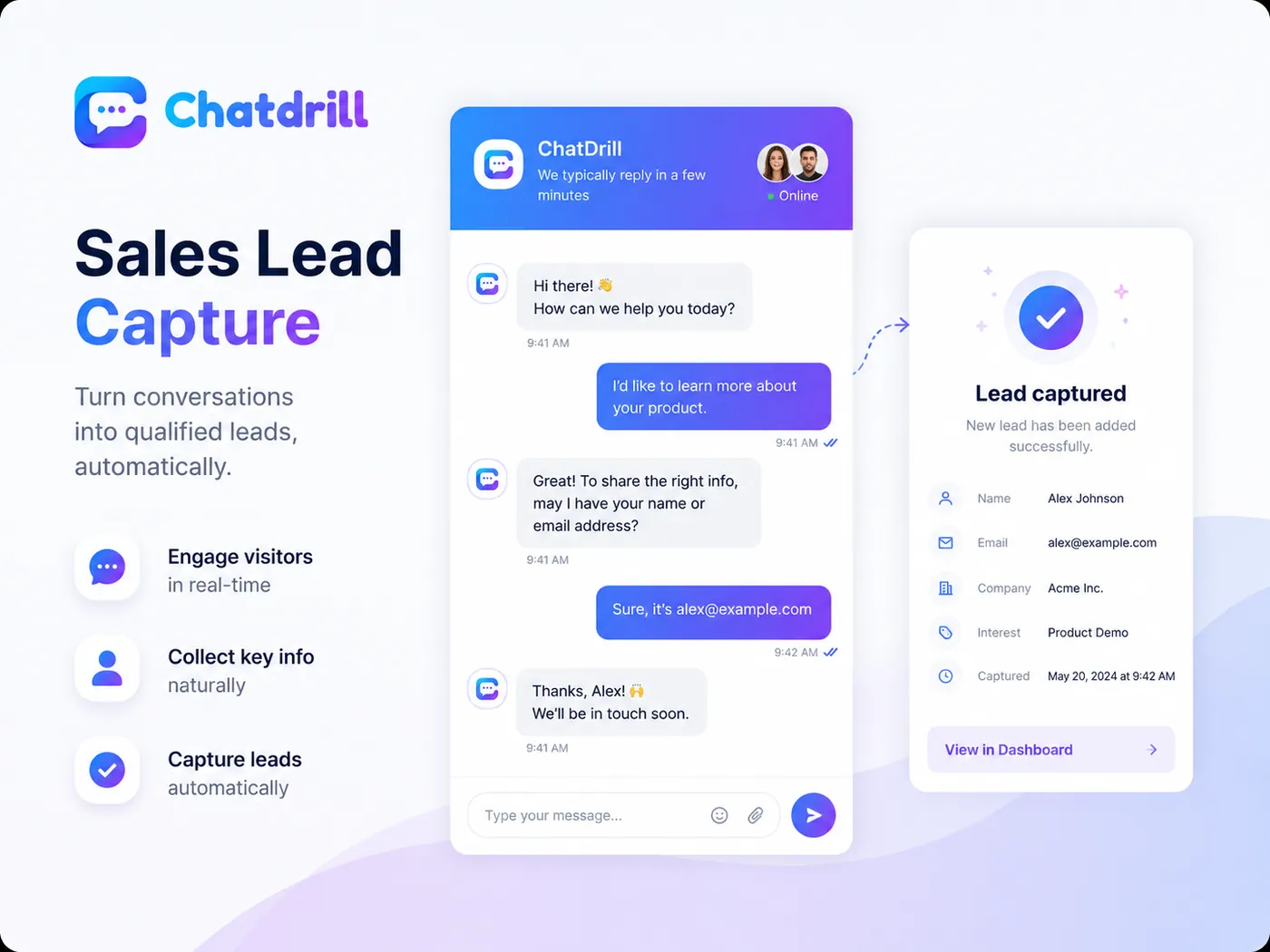
Turn live chat conversations into qualified leads.
A form asks strangers for their email before it gives them anything. A conversation earns it — usually in the same message where you answer the question that brought them to your site.
- Ask in the chat, not on a form — name, email, company and the one qualifying question that matters to your team.
- Every lead becomes a contact with the full transcript, the page they were on and the campaign that sent them.
- Route while they are still typing — assign to sales by region, language or company size, then notify the team in Slack.
- Sync to your CRM so HubSpot, Salesforce, Pipedrive or Zoho hold the same record your inbox does.
Chat widget customisation that looks like your site, not like our product.
Colour, position, avatar, greeting, launcher and language — change them here and watch the preview update before anything is published.
Accent colour
Position
Working hours, offline forms, per-page rules and language detection live in the same settings screen, so the chat widget behaves differently at 3am than it does at 3pm without anyone editing code. Running several brands? Each website gets its own widget, greeting and knowledge, while the team keeps one inbox.
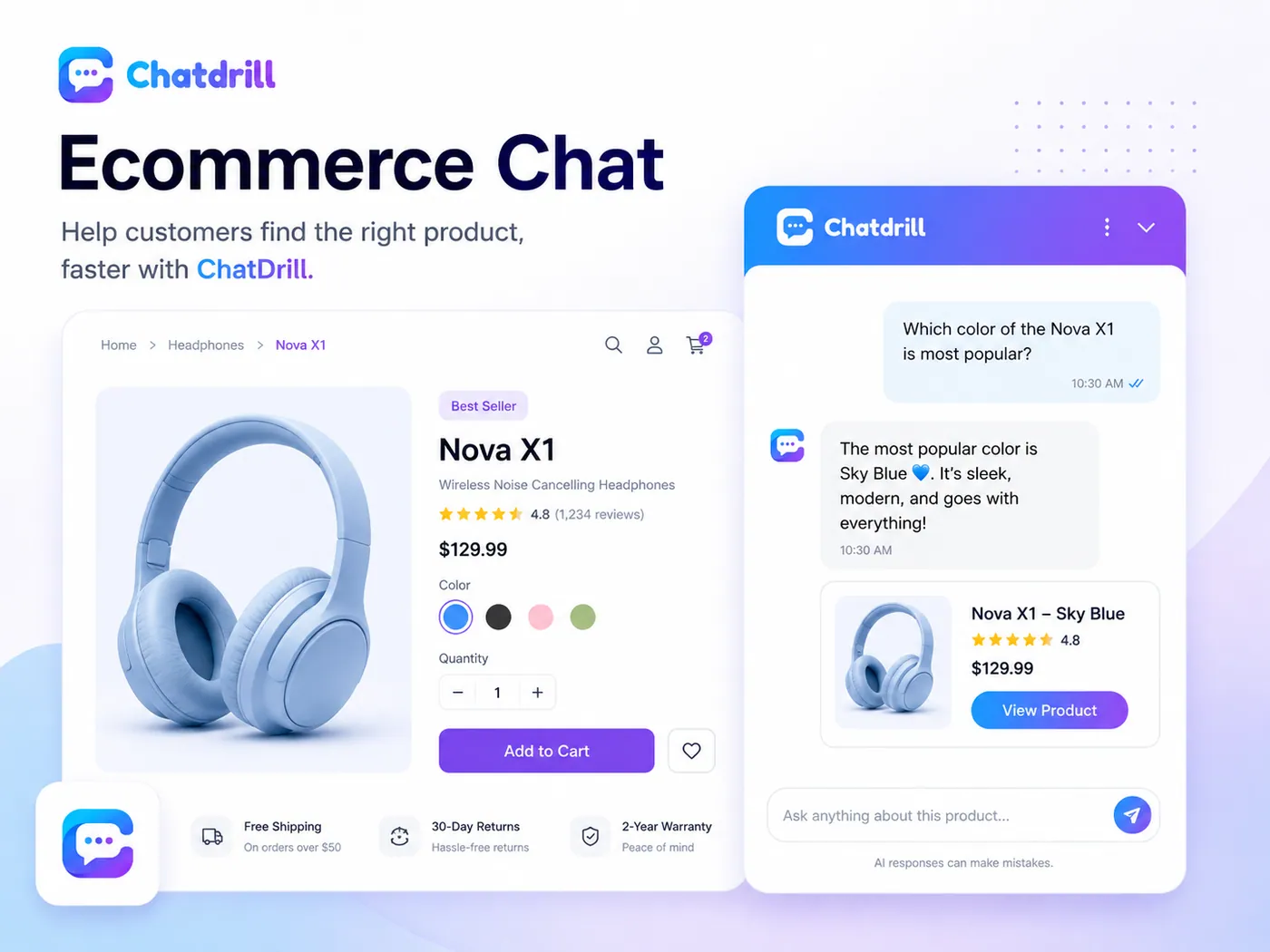
Live chat on a product page answers the question that stalls the cart.
Sizing, stock, delivery windows, returns and which variant is the right one — the questions shoppers ask at the exact moment they are deciding whether to buy.
- Answer from the product page without the shopper losing their place or reopening their basket.
- Live order status in the chat once your Shopify or WooCommerce store is connected.
- Abandoned cart triggers that offer help above a cart value you choose, rather than nagging every visitor.
- Sell where they message you — WhatsApp and Instagram threads land in the same queue as website chat.
One script tag, loaded asynchronously, so your page speed stays yours.
Paste it once and the chat widget is live on every page. If you use a platform, install the plugin instead and skip the code entirely — either way nothing blocks your render path.
- Async by default — a few kilobytes fetched after your content, so Core Web Vitals are not paying for your chat widget.
- Identify logged-in users by passing name, email, plan and any custom attribute straight from your app.
- Control it from JavaScript — open, close, prefill, hide on specific pages or launch chat from your own button.
- Google Tag Manager supported if your marketing team owns the tags rather than your developers.
<!-- Chatdrill widget — paste once, before </body> --><script> window.chatdrillSettings = { workspace: "acme-store", locale: "auto", position: "bottom-right" };</script><script src="https://cdn.chatdrill.com/widget.js" async></script>Everything live chat software should include as standard.
The small things decide whether a chat feels fast or frustrating. These are all included on every plan that has live chat — there is no feature here you have to buy twice.
Real-time messaging
Messages land instantly on both sides, with delivery and read state so nobody wonders if it went through.
Typing preview
See what a visitor is writing before they send it, and start looking up the answer early.
Canned replies
Type a shortcut, get the full answer. Keep them personal or share a set across the team.
File sharing
Send and receive images, PDFs, receipts and screenshots directly in the thread.
Emoji and formatting
Emoji, links and line breaks, so a long answer reads like a message and not a wall.
Chat transfer
Move a conversation to another agent or team with the transcript and notes attached.
Conversation history
Every past chat sits on the customer profile, across sessions, devices and channels.
Pre-chat form
Ask for a name, email or topic before the chat starts — or ask for nothing at all.
Post-chat ratings
Collect a rating and a comment at the end, then track CSAT per agent and per topic.
Offline forms
Outside working hours the widget collects the question and emails the answer when you reply.
Multilingual chat
The widget follows the visitor's browser language, and the AI agent replies in it.
Install the widget on the platform you built on.
One snippet, or a plugin where the platform has one. No redeploy and no developer needed.




Live chat software questions, answered plainly.
The things people want to know before they put a chat widget on a site they have spent a year building.
Paste one line of JavaScript before the closing body tag of your site, or install the Chatdrill plugin for Shopify, WordPress, Webflow, Wix, Squarespace or WooCommerce. The chat widget appears on every page that loads the snippet, and you can restrict it to specific paths from the dashboard. Most teams finish the install and answer their first chat the same afternoon.
It should not, and this one does not. The Chatdrill loader is a few kilobytes and is fetched asynchronously, so the browser never waits for it before rendering your page or measuring your Core Web Vitals. Chat assets load after your content, not in front of it.
Yes — the Chatdrill free plan includes live chat, does not expire and does not ask for a card. It is the same widget and the same inbox as the paid plans, with limits on seats, history and AI answers. See the full breakdown on the live chat software pricing page before you upgrade.
Yes. Accent colour, launcher position, avatar, greeting, pre-chat form fields, post-chat rating and language are all set in the dashboard, and saving publishes them without a redeploy. On paid plans you can also remove Chatdrill branding entirely.
You choose between two behaviours. The AI agent can keep answering from your own content, or the widget can switch to an offline form that captures the question and emails your reply when the team is back. Either way the widget states real working hours rather than promising a reply in a minute at 3am.
Yes. The AI agent is trained on your website, help centre and uploaded documents, and answers the repeat questions your team types every day. It cites the source behind each answer and hands the conversation to a person when confidence drops or the customer asks for one.
On both sides. The widget is responsive and collapses to a launcher on small screens, and it can be set to stay quiet on mobile where proactive messages are more intrusive. Agents answer from the iOS and Android apps with push notifications for new and assigned chats.
Fast enough that the visitor is still on the page — which in practice means seconds, not minutes. Typing previews, shared canned replies and the customer's history beside the reply box are what make that realistic for a small team. Where nobody is available, AI answers or an offline form keep the response time honest instead of leaving the chat unanswered.
Live chat software puts a messaging widget on your website so a visitor can ask a question without leaving the page, and delivers what they send to the people who answer it. Chatdrill adds an AI agent that handles the repeat questions and a shared inbox where support and sales work from the same conversation history.
Live chat is the widget the visitor types into. An AI chatbot is what answers when no person is available, or when the question has been answered before. A shared inbox is where your team reads and replies, across every channel rather than just the website. Chatdrill is all three in one product, which is why a conversation that starts with the AI can be picked up by a person without the customer starting again.
Your visitors are on the site right now.
Install Chatdrill live chat software and start the conversation today.
No credit card required.