Crisp's free tier is genuinely useful for an early-stage team, but as AI automation, reporting, and integration needs grow, that same free plan tends to feel limited, which is when most teams start comparing alternatives that better match where the business has actually grown to.
The gap Crisp leaves at higher usage is specific: deeper AI qualification, reporting that isn't gated behind an add-on, and stronger native integrations with CRM and ecommerce platforms that a growing team increasingly relies on.
That gap doesn't mean Crisp is a poor choice, for many early-stage teams it remains a sensible starting point, the question this guide addresses is what to move to once that stage has genuinely been outgrown, and how to make that move without losing momentum.
Pricing structure is also worth examining closely, since Crisp's tiered model can hide the true cost of getting full AI and reporting capability until a team is already invested in the platform.
This guide covers what to look for in a Crisp alternative, the nine strongest options in 2026, how they fit different use cases, a closer look at pricing specifically, and what to plan for before switching.
Why Teams Look for Crisp Alternatives
Teams look for Crisp alternatives once they need deeper AI automation, reporting that isn't limited to a paid add-on, or stronger integrations than Crisp's free and lower-cost tiers provide.
Simple overview
Crisp remains a strong starting point, but growing teams often find its automation and reporting depth capped exactly where they need it most.
The transition point tends to arrive predictably, once a team hires its first dedicated support or sales hire and starts needing structured reporting to manage that person's performance.
This isn't unique to Crisp, most tools built for an early-stage audience face the same pattern as their customers mature past that stage.
Recognizing this pattern early, rather than waiting for an obvious breaking point, makes the eventual evaluation of alternatives feel proactive rather than reactive.
Where Crisp's free tier runs out
AI automation, co-browsing, and detailed reporting are all limited or paywalled on Crisp's lower tiers, prompting a search for alternatives once those features become necessary.
For a team specifically outgrowing the AI limitation, the choice often comes down to paying for Crisp's higher tier versus switching entirely, and it's worth comparing that upgrade cost directly against a platform built AI-first from the start.
This comparison is worth doing explicitly rather than defaulting to whichever option requires less immediate effort, since the cheaper short-term choice isn't always the better long-term one.
What growing teams need instead
Teams generally want AI that actually qualifies leads, reporting included at a reasonable tier, and integrations that don't require custom work.
The most common driver specifically is AI qualification, teams that started with Crisp for simple messaging often find themselves wanting the chat widget to do more active work as their lead volume grows.
This shift in expectation usually happens gradually, making it worth periodically reassessing whether the current tool still fits rather than waiting for an obvious breaking point.
A useful trigger for that reassessment is simply asking whether the team is manually doing something the chat tool could reasonably automate, if the answer is yes repeatedly, it's a sign to look at alternatives seriously.
What to Look for in a Crisp Alternative
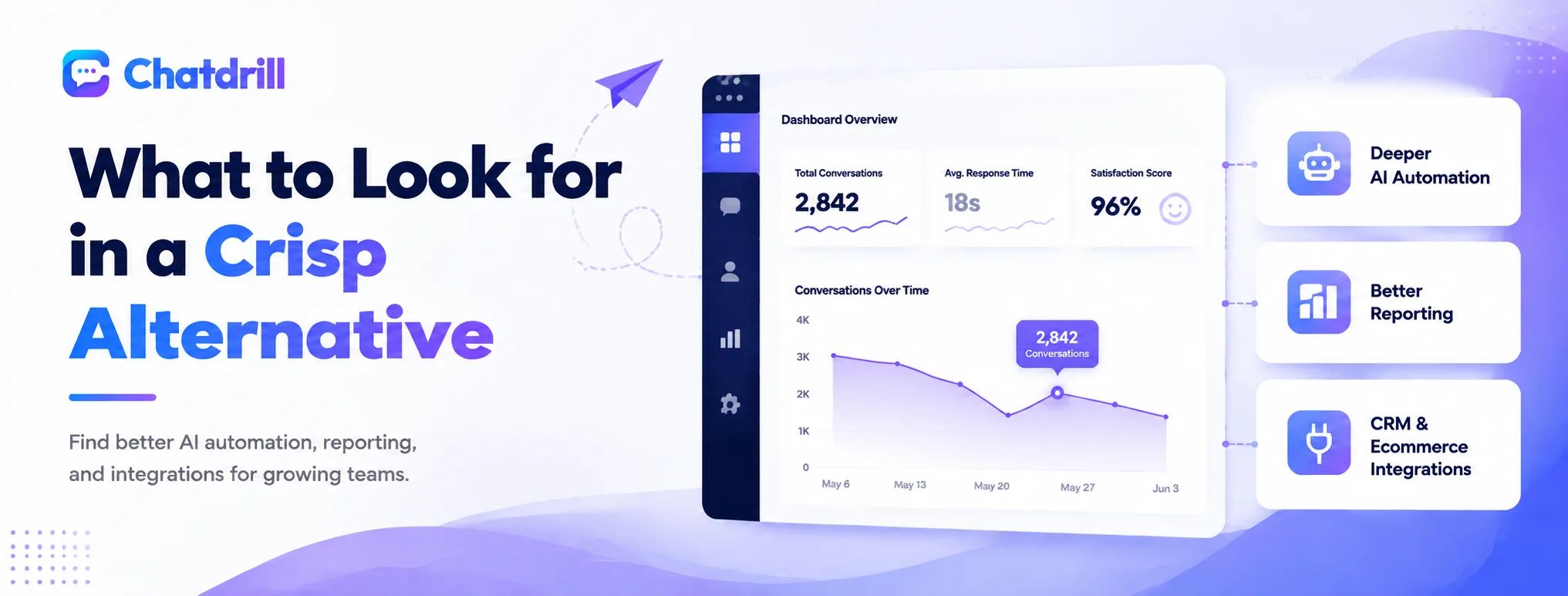
A strong Crisp alternative offers deeper AI automation than Crisp's lower tiers, includes reporting without a separate paid add-on, and connects natively to the CRM or ecommerce platform already in use.
Deeper AI automation
Look for a platform where AI can qualify leads and resolve full conversations, not just relay messages to a shared inbox.
A useful test during evaluation is feeding the AI a handful of real customer questions, ideally ones with some ambiguity, and seeing whether it responds usefully or falls back to a generic deflection.
It's also worth testing how the AI handles a question outside its scope, a graceful escalation is a stronger signal than a confidently wrong answer.
Reporting included, not gated
Analytics on response time, satisfaction, and conversion should be part of the core plan rather than requiring an upgrade to see.
It's worth checking specifically whether reporting includes trend data over time, not just a current snapshot, since spotting a slow decline in response time matters more than any single day's number.
Confirming whether reporting can be segmented by agent or team, not just shown as a single company-wide number, is also worth checking during evaluation.
Ecommerce and CRM integrations
Native connections to the tools already in use avoid the custom integration work that slows down a switch.
Confirming the depth of an integration matters as much as its existence, a connection that only syncs a contact's name is far less useful than one that pushes full conversation context into a CRM record.
Testing an integration directly during a trial, rather than relying on a features page description, is the most reliable way to confirm it works as expected.
The Best Crisp Alternatives in 2026
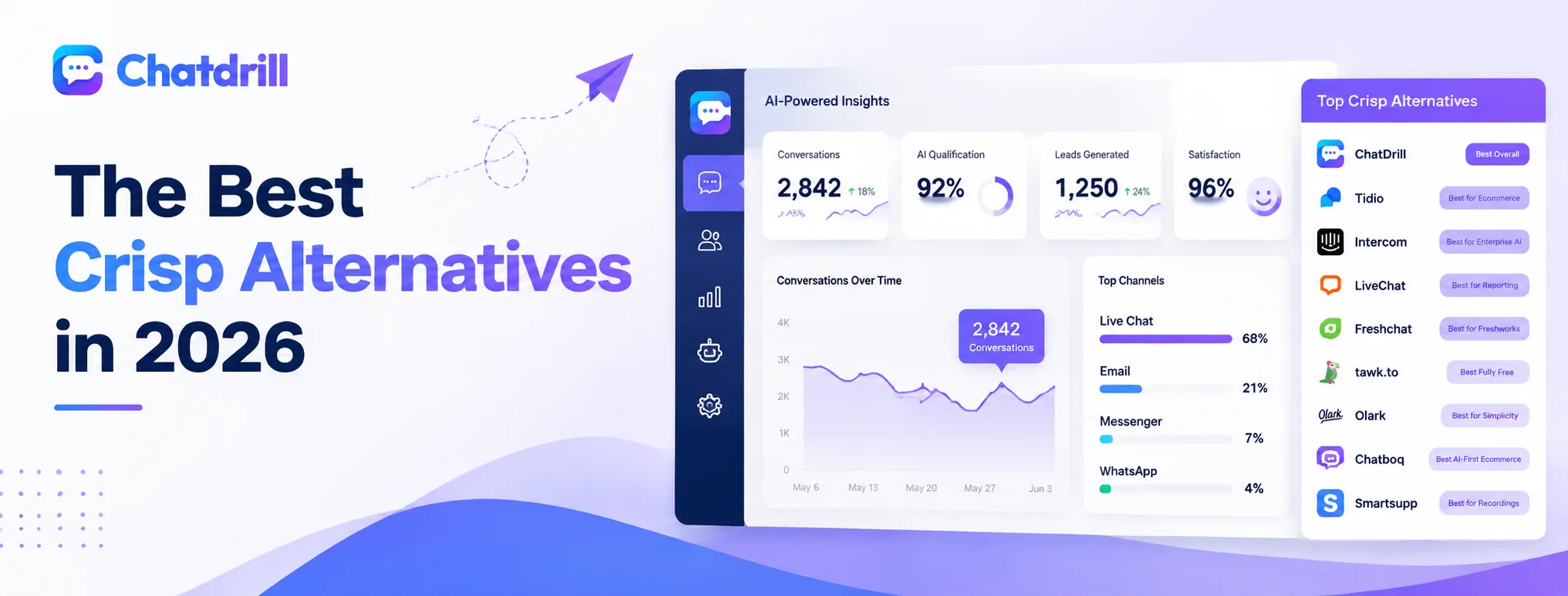
ChatDrill leads for AI-driven qualification, with Tidio, Intercom, LiveChat, Freshchat, tawk.to, Olark, Chatboq, and Smartsupp each standing out for a more specific need.
ChatDrill — best overall Crisp alternative
ChatDrill includes AI qualification and lead scoring in its core plans, along with analytics that aren't gated behind a premium tier the way Crisp's reporting can be.
Teams migrating from Crisp specifically for AI depth tend to find the transition natural, since ChatDrill's shared inbox concept will feel familiar while the AI layer underneath does meaningfully more work automatically.
The setup process is also fast enough that most teams report being fully operational within a day of switching, minimizing disruption during the transition itself.
Tidio — best for ecommerce
Tidio matches Crisp's free-tier accessibility with a stronger focus on ecommerce chatbots and abandoned-cart recovery.
For a store specifically, Tidio's product-aware automation tends to outperform Crisp's more general-purpose messaging, at a similar overall price point on comparable plans.
Its Shopify-specific integration is also more purpose-built than what Crisp offers, worth weighing heavily for a store whose primary channel is Shopify.
Intercom — best for enterprise AI
Intercom offers significantly deeper AI automation than Crisp, at a correspondingly higher, usage-based price point.
This is the natural move for a team that has genuinely outgrown SMB-tier tools altogether, though it's worth budgeting carefully given how Intercom's pricing scales with both seats and AI usage together.
Teams making this specific jump should expect a more involved setup process than moving to a lighter, more chat-focused alternative.
LiveChat — best for reporting
LiveChat trades Crisp's free tier for deeper reporting and one of the largest integration libraries in the category.
Teams that valued Crisp mainly for its shared inbox concept, but need substantially more reporting depth to manage a growing team, tend to find LiveChat the more natural fit than an AI-first alternative.
Its agent-level reporting specifically tends to outperform Crisp's, useful once a team is large enough to need individual performance visibility.
Freshchat — best for the Freshworks ecosystem
Freshchat suits teams planning to adopt the wider Freshworks suite, including Freshdesk for ticketing, alongside chat.
Its value is tied closely to that broader ecosystem, a team not already invested in Freshworks products is unlikely to choose it purely on chat merits over more chat-focused alternatives.
For a team already evaluating Freshdesk for ticketing, bundling in Freshchat can simplify vendor management compared to running two separate platforms.
tawk.to — best fully free option
tawk.to goes further than Crisp on the free tier, unlimited agents at no cost, at the expense of a more dated interface.
For a team purely optimizing for cost, with no immediate AI need, tawk.to is difficult to beat, though the trade-off shows up quickly once automation becomes a genuine requirement.
Many teams treat tawk.to as a genuinely useful starting point, planning from the outset to migrate once automation needs materialize rather than staying on it indefinitely.
Olark — best for simplicity
Olark keeps things deliberately simple, appealing to teams that find Crisp's growing feature set more than they actually need.
This is a reasonable landing spot specifically for a team that wants to simplify rather than add capability, a smaller, more focused feature set with fewer configuration decisions to make.
Teams that value fewer decisions over more features tend to find Olark's simplicity genuinely refreshing rather than limiting.
Chatboq — best AI-first ecommerce alternative
Chatboq focuses AI automation specifically on ecommerce lead capture, a narrower but deeper focus than Crisp's general-purpose inbox.
It shares ChatDrill's AI-first approach but leans more specifically toward ecommerce sales conversion, worth comparing directly against ChatDrill if that specific use case is the priority.
Stores considering both should test each directly with real product questions, since the two platforms' AI can behave noticeably differently despite a similar overall positioning.
Smartsupp — best for visitor recordings
Smartsupp adds visitor session recordings on top of live chat, a feature Crisp doesn't offer, aimed at conversion-focused ecommerce teams.
This is a genuinely differentiated feature rather than a general improvement over Crisp, worth choosing specifically if visitor behavior insight is the primary gap being solved for.
Teams using session recordings alongside chat data tend to uncover UX issues that chat transcripts alone wouldn't reveal.
Crisp Alternatives by Use Case
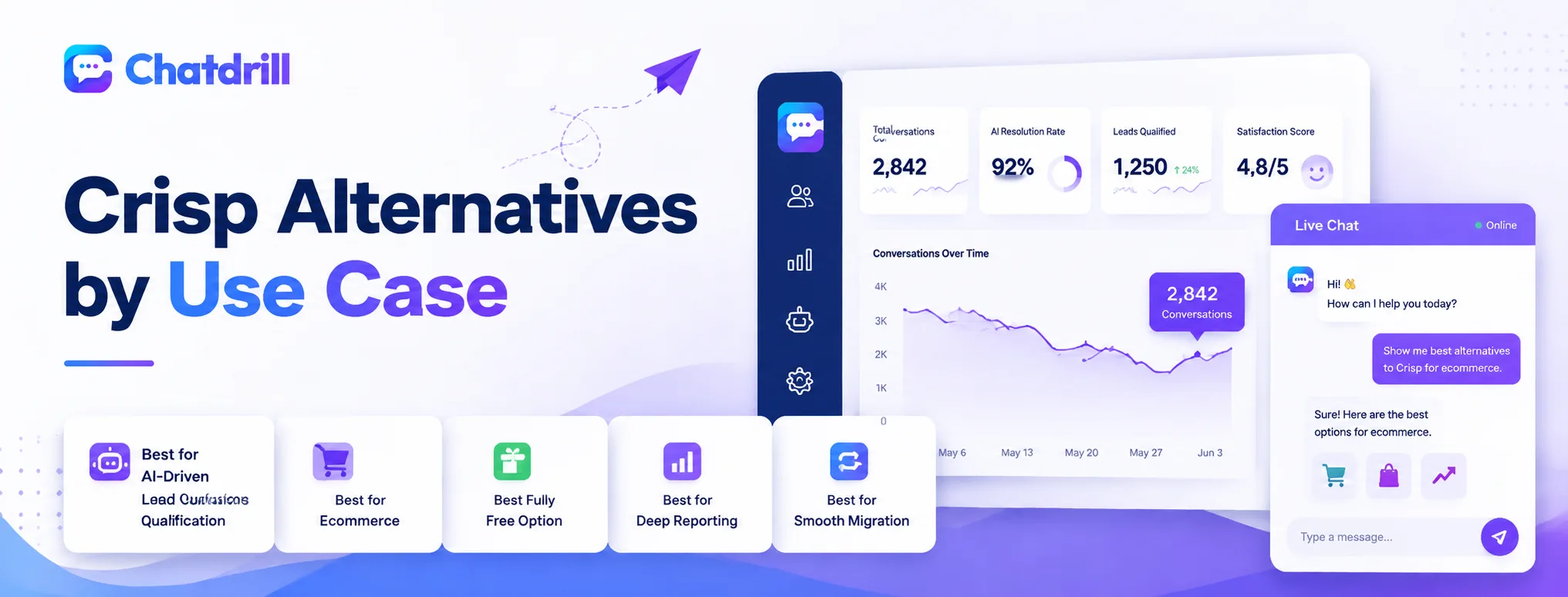
ChatDrill and Intercom suit AI-driven lead qualification, ChatDrill and Tidio suit ecommerce, tawk.to remains the most fully free option, and LiveChat offers the deepest reporting among the group.
Best for AI-driven lead qualification
ChatDrill and Intercom both offer AI that actively qualifies and routes leads rather than just relaying messages.
ChatDrill tends to suit a growing team better on cost predictability, while Intercom's deeper feature set justifies its price for a larger, more established organization.
Testing both directly with real qualification scenarios is worth the time, since the two platforms' AI can behave quite differently despite similar marketing claims.
Best for ecommerce
ChatDrill, Tidio, and Chatboq are all built with ecommerce lead capture and cart recovery in mind.
Between the three, ChatDrill balances ecommerce automation with broader lead qualification capability, while Tidio and Chatboq lean more narrowly and specifically toward the ecommerce use case.
A store with a simpler catalog may find Tidio or Chatboq sufficient, while one with more complex B2B or wholesale needs may prefer ChatDrill's broader qualification capability.
Best fully free option
tawk.to offers unlimited agents at no cost, going further than Crisp's own free tier.
This is worth choosing specifically when cost is the binding constraint and AI automation isn't yet a priority, with the expectation of revisiting the decision once that changes.
Teams choosing this route should plan for an eventual migration rather than assuming the free setup will remain sufficient indefinitely.
Best for deep reporting
LiveChat and Intercom offer the most detailed analytics dashboards among Crisp alternatives.
LiveChat tends to be the more cost-effective route to that reporting depth specifically, without requiring the broader platform commitment that comes with Intercom.
Teams choosing based on reporting alone should also weigh how much AI automation matters, since neither platform leads specifically on that dimension compared to ChatDrill.
Best for a smooth migration off Crisp
ChatDrill's shared inbox concept closely mirrors Crisp's own layout, which tends to make the switch feel more familiar to agents than moving to a platform with a very different interface.
Teams prioritizing minimal retraining time during the switch tend to weigh this similarity heavily, even when a less familiar alternative might offer marginally more features on paper.
What to Consider Before Switching From Crisp
Before switching, export existing conversation history, plan to rebuild any automation rules that won't transfer, give the team time to onboard to a new interface, and set a clear cutover date so the transition doesn't drag on indefinitely.
Exporting conversation history
Crisp supports data export, but confirm the new platform's import process preserves the detail needed before migrating fully.
Running a small test batch through the export and import process before the full migration catches formatting issues while they're still easy to fix.
Keeping a local backup of the export outside both platforms is a simple safeguard worth taking during any migration.
Rebuilding automation rules
Chatbot flows and triggers typically need to be recreated on the new platform rather than transferring automatically.
Documenting Crisp's current triggers and automation rules before starting the switch avoids quietly losing configuration that took real time to get right the first time.
This is also a natural moment to simplify overly complex rules that accumulated over time rather than rebuilding them exactly as they were.
Team onboarding and training
Even an intuitive new interface takes some adjustment, so budget time for the team to get comfortable before fully cutting over.
Running both platforms in parallel for a short overlap period, rather than cutting over all at once, tends to smooth this transition considerably for the team.
Designating one team member as the go-to resource for questions during the transition period tends to speed up everyone else's adjustment.
Scheduling a brief follow-up check-in a few weeks after the cutover, rather than assuming the transition is complete once the new tool is live, catches any lingering friction points early.
Crisp Pricing vs Alternatives: A Closer Look
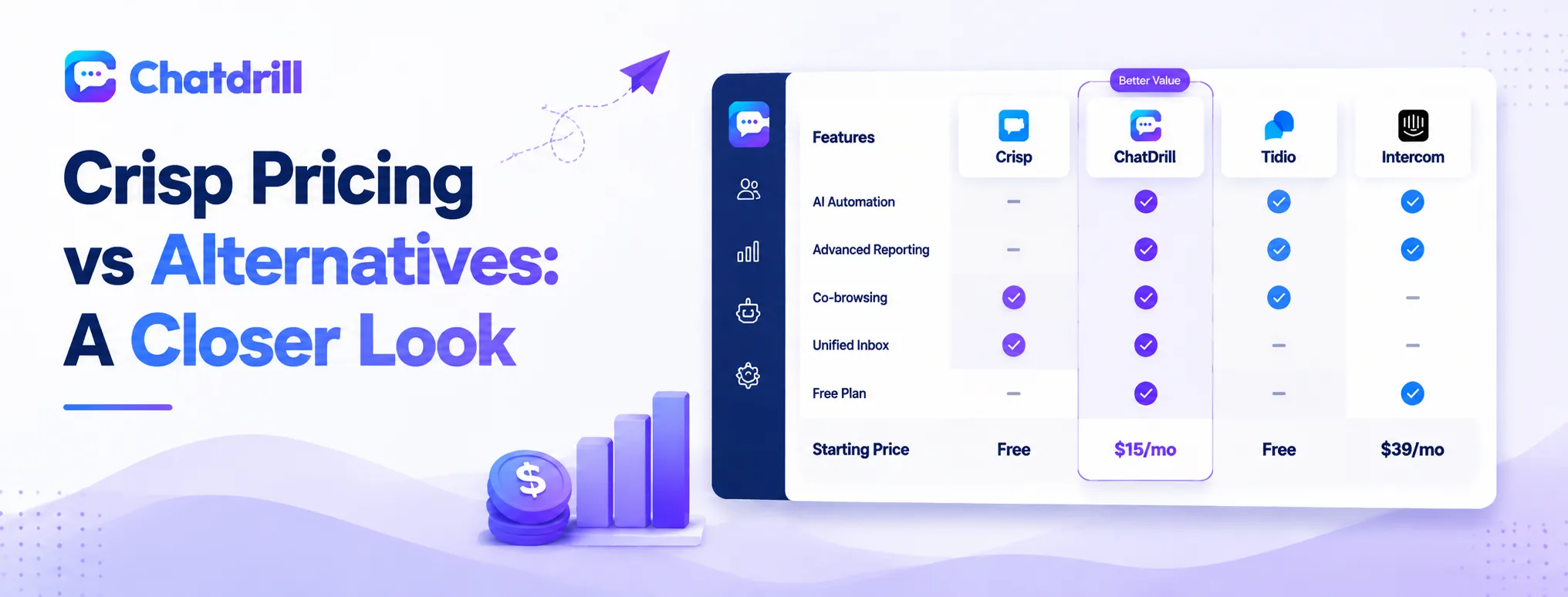
Crisp's pricing is structured around tiered plans that gate AI automation and deeper reporting behind higher tiers, which is worth comparing carefully against alternatives that bundle those same features into a lower-cost core plan.
How Crisp's free and paid tiers are structured
Crisp's free plan covers basic messaging and a unified inbox, with AI automation, co-browsing, and deeper reporting reserved for its paid tiers.
The jump from free to paid is where most of the platform's real capability becomes available, worth budgeting for once a team is ready to move beyond basic messaging.
Reviewing the specific feature list at each tier before committing helps avoid discovering a needed feature is one tier higher than expected.
What's actually gated behind Crisp's higher tiers
AI chatbot depth, detailed analytics, and co-browsing are the features most commonly locked behind an upgrade, exactly the capabilities a growing team tends to need most.
It's worth checking Crisp's current tier breakdown directly, since exactly what's gated at each level can shift over time as the platform evolves its plans.
This is a common pattern across the industry, not unique to Crisp, worth checking for on any platform being seriously evaluated.
How ChatDrill's pricing compares at similar team sizes
ChatDrill includes AI automation and reporting in its core paid plans rather than reserving them for a premium tier, which tends to produce a lower total cost for a team that needs both from the start.
At a comparable team size, this generally means less need to budget for a later upgrade simply to unlock features a team already expected to have.
This structure also simplifies budgeting internally, since finance doesn't need to plan for a tier upgrade as a separate future expense.
How tawk.to and Olark compare on cost alone
tawk.to remains free even at the base tier, with AI and premium features available as add-ons; Olark sits in a similar lower-cost paid range to Crisp's entry tier.
Neither matches the AI depth of ChatDrill or Crisp's higher tiers, so the cost comparison should account for that capability gap, not price alone.
For a team specifically prioritizing lowest possible cost over AI depth, either remains a reasonable choice worth testing directly.
What to ask any vendor about pricing before signing
Ask specifically which features are included at the tier being quoted, rather than assuming a feature seen in a demo is part of every plan.
Requesting a written breakdown of what upgrading a tier later would cost avoids a surprise if the team's needs grow within the first year.
It's also worth asking whether pricing is locked in for a period or subject to change, since that affects how confidently a cost projection can be trusted.
Calculating total cost of ownership, not just sticker price
Total cost of ownership includes any tier upgrades needed to get full AI and reporting capability, not just the entry-level price advertised.
A platform with AI included at a lower total tier can end up cheaper overall than one with a lower sticker price that requires an upgrade to match the same capability.
Factoring in the internal time spent managing tier upgrades and renegotiations over time also belongs in this calculation, not just the vendor's invoice.